.NET for Beginners: Easy to Start, Hard to Understand
The first week with a new engineer on a .NET team usually goes well. They clone the repo, run it, and a few minutes later the solution is running on their machine. Somewhere around week three, a ticket asks why a setting works on their machine and not in staging, and I watch the confidence drain out of them. They’ve run into the part of the .NET ecosystem that nobody showed them, because it doesn’t show itself.
I love .NET, and I’d pick it again for most projects. But I’ve come to believe that modern .NET is easy to get started with and hard to understand, and that we keep treating those as the same problem.
The door got wider, the house didn’t get smaller
The progress is real. In 2014 Microsoft announced it would open source .NET and bring it to Linux and macOS. I remember that announcement clearly, and I was really excited about the direction Microsoft was taking, especially that early in my career. .NET Core 1.0 shipped in 2016. By 2021, .NET 6 let you write a working web service in a handful of lines, and .NET 10 lets you run a single C# file with no project setup at all (dotnet run app.cs). Every release also adds more syntactic sugar, which means shorter ways to write things the language could already do.
All of that work made it easier to get through the front door. A modern .NET app still hides a lot of machinery behind one startup line. There’s dependency injection, a system that creates the objects your code needs and hands them over automatically. There are design patterns, like the Builder pattern, used across the board: you configure an object step by step and then call Build(). That’s how WebApplication.CreateBuilder, Host.CreateApplicationBuilder and ConfigurationBuilder work. There’s a configuration system that merges settings from files, environment variables and secret stores, with later sources quietly overriding earlier ones. There’s middleware, code every web request passes through in a fixed order. None of it appears in the code a beginner reads.
Older .NET was noisier. People complained about all that setup code, fairly. But the noise was a map. You could read your way from the entry point to the thing that broke. We removed the noise, and the map went with it.
A gift to experts, a tax on beginners
Abstractions are wonderful when you already know what they hide. When I see a single line that registers a service, I read a compressed paragraph I can unpack in my head. Someone in their first month sees a magic spell. It works, they don’t know why, and when it stops working they don’t know where to look.
I think the .NET ecosystem has mostly optimized for the second year rather than the first week. The defaults, the conventions, and the docs that assume you know what a “host” is make experienced engineers very productive. But the cost of learning didn’t disappear. It got pushed to the moment something breaks, which is the worst time to learn anything.
The fair counterargument is that every mature platform works this way. Nobody should need to understand memory management to write a loop. Hiding detail is the point. I mostly agree. The line I’d draw is between detail you’ll never need and detail you’ll need in week three. Memory management is the first kind for most app developers. Where a setting came from is the second kind. Modern .NET hides both with the same enthusiasm.
When the code writes itself
AI coding assistants are very good at getting you through the front door. Ask for an endpoint, a background job, or an AI Agent, and you’ll usually get something that compiles and runs.
So a junior engineer today can produce working code on top of layers they can’t see, and the code itself is something they didn’t write and may not be able to explain. That’s two levels of fog. Newer frameworks like Microsoft Agent Framework add a third, because an agent has its own hidden loop.
Here’s roughly what a junior engineer, or their coding agent, writes to give an agent one tool:
// Program.cs
[Description("Look up the shipping status of an order.")]
static string GetOrderStatus(string orderId) => $"Order {orderId} shipped on Tuesday.";

AIAgent agent = new AIProjectClient(new Uri(endpoint), new DefaultAzureCredential())
    .AsAIAgent(
        model: "gpt-5.4-mini",
        instructions: "You are a helpful support assistant.",
        tools: [AIFunctionFactory.Create(GetOrderStatus)]);

Console.WriteLine(await agent.RunAsync("Where is order 1042?"));
That’s the whole agent, and it works. What you don’t see is the loop RunAsync runs for you. Agent Framework wraps the model client in a pipeline from Microsoft.Extensions.AI, and one piece of it, FunctionInvokingChatClient, handles the back and forth. Simplified, it does something like this:
// What RunAsync does for you (simplified pseudocode, not real API)
messages = [instructions, "Where is order 1042?"];
while (true)
{
    response = await model.GetResponseAsync(messages, tools); // a network call to the model
    if (response.HasNoToolCalls) return response.Text;        // the answer you printed
    foreach (call in response.ToolCalls)                      // e.g. GetOrderStatus("1042")
        messages.Add(Invoke(call));                           // your method runs here
}
It helps to know what that network call actually is. An agent talks to the model through an HTTP API, such as OpenAI’s Responses API. You send a list of messages and you get text back. In the simplest setup the model remembers nothing between calls, so the conversation is sent again each time, and you pay by the token. The model also can’t run anything. It only produces text.
Tool calling is how that text turns into action. Along with the messages, the request describes each tool as a JSON schema, a structured description of its name and parameters. When the model decides it needs one, it replies with a request instead of an answer:
// Model API response (OpenAI Responses API, trimmed)
{
  "type": "function_call",
  "call_id": "call_12345xyz",
  "name": "GetOrderStatus",
  "arguments": "{\"orderId\":\"1042\"}"
}
Your code, not the model, runs GetOrderStatus, sends the result back as another message, and calls the model again. That’s the loop above. The tool descriptions ride along on every trip, and they count as tokens too.
The first snippet never mentions a loop or a second call to the model. So when the tool runs five times, or never, or with an order number the model made up, the explanation lives in code the junior never saw. Stacked up, it looks like this:
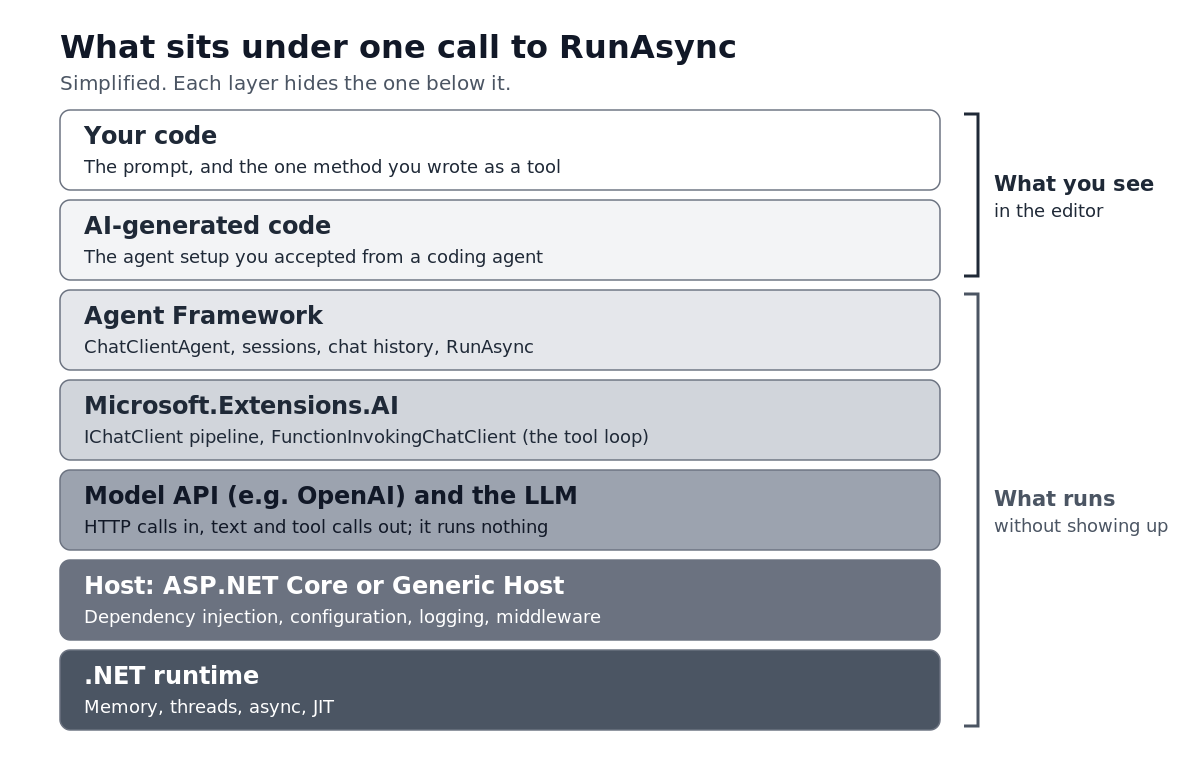
I don’t think the answer is to keep juniors away from these tools. I use them every day. But the engineers who grow fastest with AI help treat its output as a first draft to question. They ask where an object came from and which setting won. The tools made those questions more important.
Whose job is the gap?
It’s tempting to call this the learner’s problem. Read the docs and put in the hours. That’s how a lot of us learned, especially my generation, and there’s truth in it.
As a seasoned engineer, though, I’ve stopped believing that’s the whole answer. The knowledge that closes the gap in a specific codebase usually lives in a few senior heads. It covers which conventions we follow, what gets configured at startup, and which clever abstractions we added on purpose versus inherited and never questioned. If that context only exists in conversation, every new hire pays the same tax. Writing it down, walking a new person through one real request from start to finish, and being honest about which layers we could delete are leadership work. It decides how fast people get good.
I’m not sure .NET can be made easy to understand without giving up some of what makes it productive. What I keep coming back to is simpler. We spent a decade making .NET easier to get started with. Who’s going to spend the next one making it easier to understand?